Kitchen · Free

Recipe Card Starter

Turn chef’s notes into a structured recipe card, with missing details flagged for confirmation before your team uses it.

From the chef’s notes to a card your team can use.

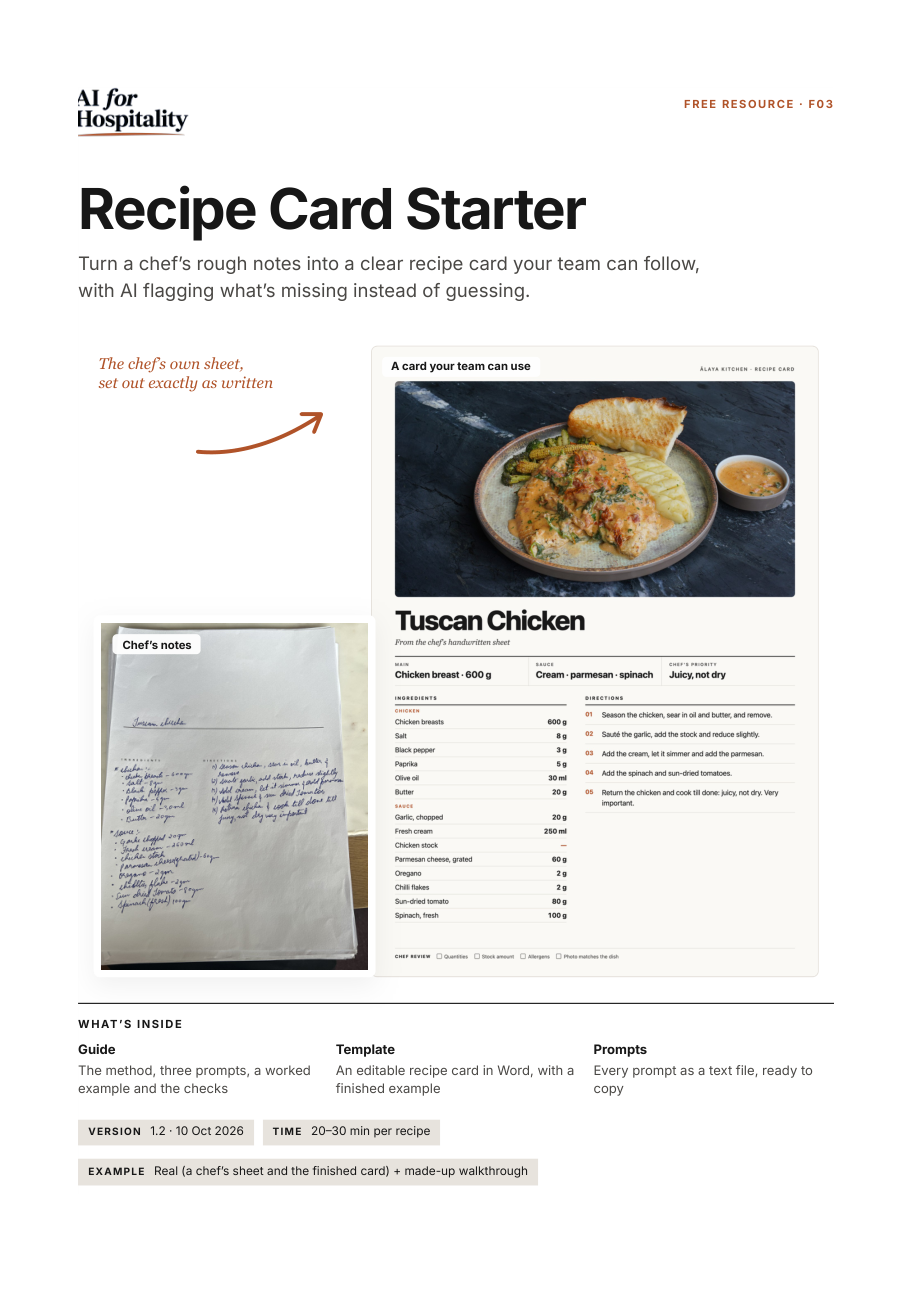
A chef’s handwritten Tuscan Chicken sheet from Ālaya, set out exactly as written, with a real photo of the dish.
Chef’s notes
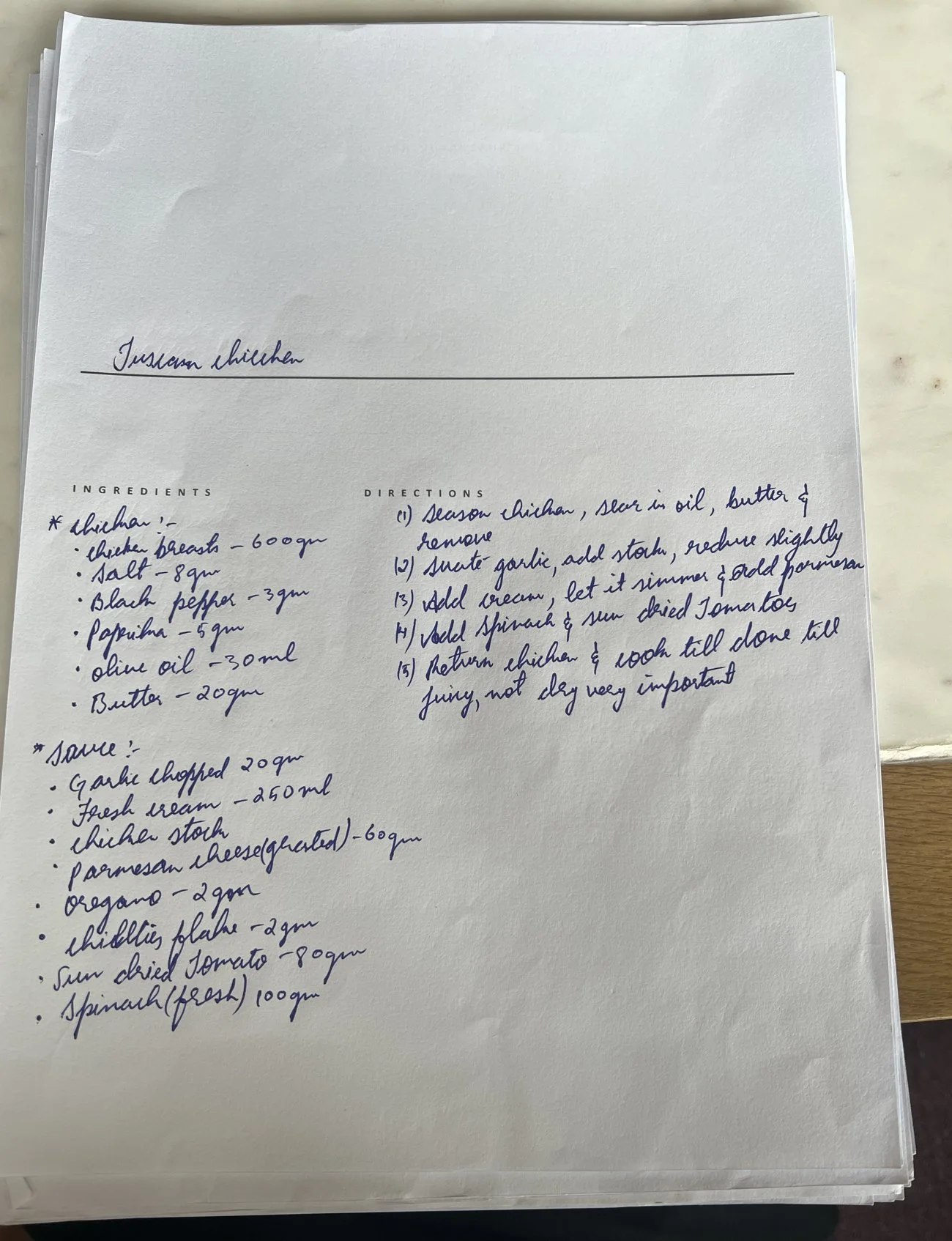
The chef’s handwritten Tuscan Chicken sheet. Chicken: chicken breasts 600 g, salt 8 g, black pepper 3 g, paprika 5 g, olive oil 30 ml, butter 20 g. Sauce: garlic chopped 20 g, fresh cream 250 ml, chicken stock with no amount, parmesan cheese grated 60 g, oregano 2 g, chilli flakes 2 g, sun-dried tomato 80 g, spinach 100 g. Five directions, ending: cook till done, juicy, not dry, very important.

Chef’s notes

The chef’s handwritten Tuscan Chicken sheet. Chicken: chicken breasts 600 g, salt 8 g, black pepper 3 g, paprika 5 g, olive oil 30 ml, butter 20 g. Sauce: garlic chopped 20 g, fresh cream 250 ml, chicken stock with no amount, parmesan cheese grated 60 g, oregano 2 g, chilli flakes 2 g, sun-dried tomato 80 g, spinach 100 g. Five directions, ending: cook till done, juicy, not dry, very important.
Finished card
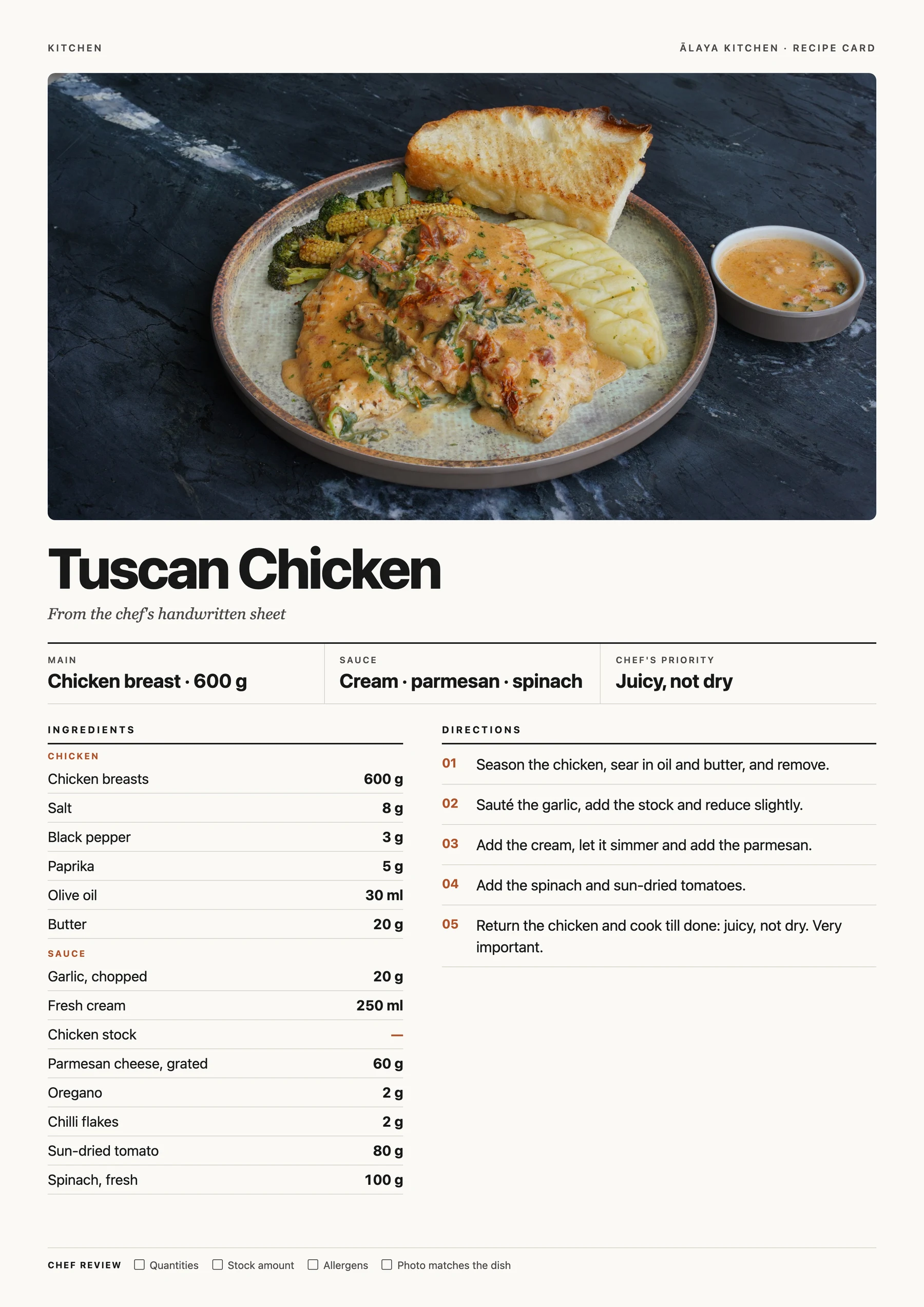
The finished Tuscan Chicken recipe card: a photo of the plated dish, the main (chicken breast, 600 g), sauce (cream, parmesan, spinach) and the chef’s priority (juicy, not dry), the same ingredients grouped as chicken and sauce with the chicken stock shown as a dash for the chef to confirm, five directions and a chef review line.

Finished card

The finished Tuscan Chicken recipe card: a photo of the plated dish, the main (chicken breast, 600 g), sauce (cream, parmesan, spinach) and the chef’s priority (juicy, not dry), the same ingredients grouped as chicken and sauce with the chicken stock shown as a dash for the chef to confirm, five directions and a chef review line.

Nothing was guessed: the sheet gives no amount for the chicken stock, so the card flags it for the chef.

Want to improve the photo too? Explore the Food Photo Starter

Free resource

Recipe Card Starter

Turn a chef’s rough notes into a clear recipe card your team can follow, with AI flagging what’s missing instead of guessing.

What you receive

  • PDF guide, 8 pages
  • Word recipe-card template
  • Prompts file

Time Allow 20–30 minutes for a first draft, plus chef review.

Essential check: confirm every quantity and allergen, and get the chef’s approval before the team uses the card.

Get the Recipe Card Starter

Free. PDF guide, 8 pages, Word recipe-card template, Prompts file.
Next, a download button appears here straight away, and we email you a link too.
Loading the form…

We use your email to send this resource. We add you to the newsletter only if you tick the box. See the privacy notice.

Inside the guide

Every page of the PDF guide. Select a page to see it larger.

  • Cover: a chef's handwritten Tuscan Chicken sheet beside the finished recipe card, and what's inside the kit

    Page 1: Cover: a chef's handwritten Tuscan Chicken sheet beside the finished recipe card, and what's inside the kit

    Cover: a chef's handwritten Tuscan Chicken sheet beside the finished recipe card, and what's inside the kit
    Page 1
  • Contents and the start-here section

    Page 2: Contents and the start-here section

    Contents and the start-here section
    Page 2
  • The result: the finished Tuscan Chicken card and what the method did, then step 1

    Page 3: The result: the finished Tuscan Chicken card and what the method did, then step 1

    The result: the finished Tuscan Chicken card and what the method did, then step 1
    Page 3
  • The digitisation prompt (R1) and step 3, filling the gaps with the chef

    Page 4: The digitisation prompt (R1) and step 3, filling the gaps with the chef

    The digitisation prompt (R1) and step 3, filling the gaps with the chef
    Page 4
  • The trace-every-number prompt (R3), step 4 and the start of a made-up worked example

    Page 5: The trace-every-number prompt (R3), step 4 and the start of a made-up worked example

    The trace-every-number prompt (R3), step 4 and the start of a made-up worked example
    Page 5
  • The worked example: the gaps flagged, then the card after the chef's answers

    Page 6: The worked example: the gaps flagged, then the card after the chef's answers

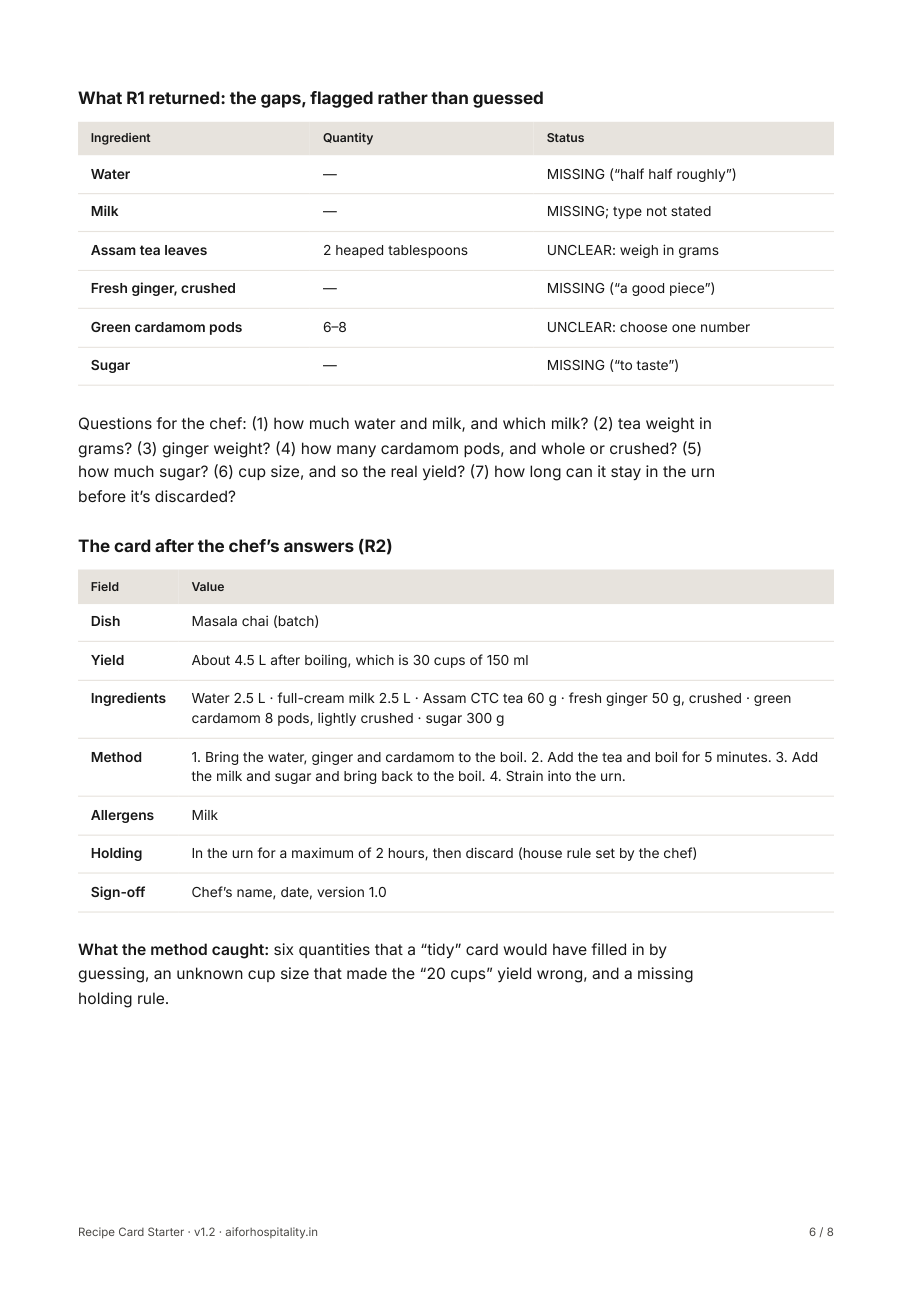
    The worked example: the gaps flagged, then the card after the chef's answers
    Page 6
  • Checks before the card is used, and troubleshooting

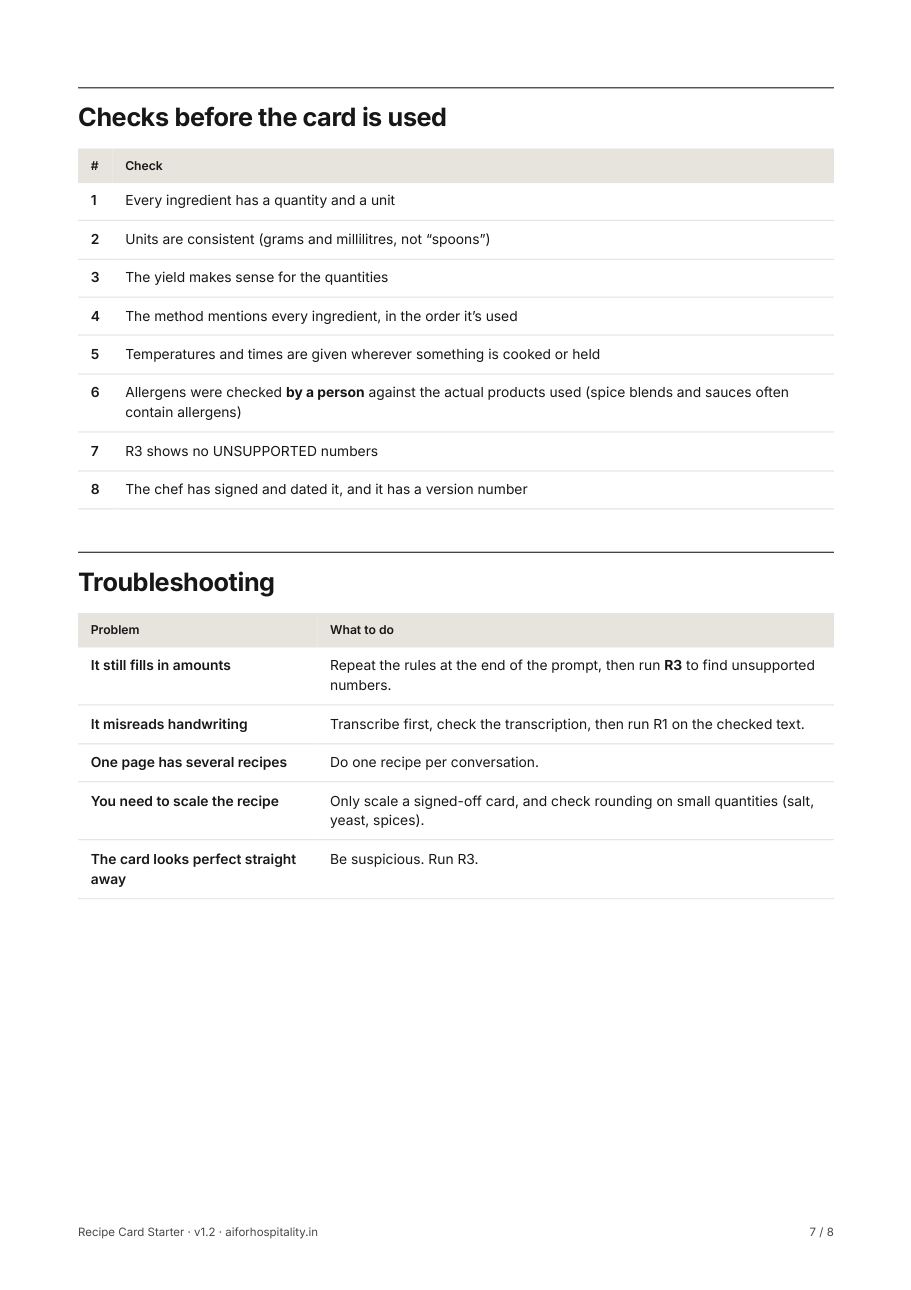
    Page 7: Checks before the card is used, and troubleshooting

    Checks before the card is used, and troubleshooting
    Page 7
  • Using this resource

    Page 8: Using this resource

    Using this resource
    Page 8

Kit details

You need
  • One recipe in any form: notebook photo, typed notes or a voice-note transcript
  • Any AI chat tool
  • The chef who makes the dish, for sign-off
Inside the guide
  • Start-here page
  • Editable recipe card template: code, yield, portion, ingredients, method, allergens, holding, plating
  • Digitisation prompt with missing-input rules
  • Completed example: rough notes to finished card, with flags
  • Checks for units, yield maths, allergens and chef sign-off
How it works, and the checks
  1. Give the AI your notes with the digitisation prompt.
  2. Read the 'missing or unclear' list it returns. It must not invent quantities.
  3. Fill the gaps with the chef and paste the answers back.
  4. Check the finished card and get the chef’s sign-off.

Checks before you use it

  • Every ingredient has a quantity and a unit
  • Yield and portion add up
  • Allergens are listed and checked by a person

Questions

Which AI tool do I need?

Any AI chat tool. To work from a photo of handwritten notes, it needs to accept images.

How do I use the files?

Unzip the download and start with the PDF guide: it takes you through every step. The prompts file has each prompt ready to copy. The Word file is the editable worksheet or template, and it also opens in Google Docs.

Can I share it with my team?

Yes, use it freely in your own business. Please don’t resell or republish the files; share this page’s link instead.

The download didn’t start, or the email hasn’t arrived

Use the download button on this page after you enter your email. If the email isn’t in your inbox after a few minutes, check spam or promotions, or email rish@aiforhospitality.in and we’ll send the files.

Next

Improve the photo next

Food Photo Starter: Make an ordinary phone photo of a dish you serve look clean and appetising, without changing the food.